| OsProject | |
|---|---|
| id | pynomina |
| state | active |
| owner | WolfgangFahl |
| title | pynomina |
| url | https://github.com/WolfgangFahl/pynomina |
| version | 0.0.11 |
| description | personal finance tool |
| date | 2025-03-26 |
| since | 2024-10-06 |
| until | |
pynomina is a personal finance tool designed to provide a flexible and enduring solution for managing financial records from diverse personal accounting tool sources. It aims to address the challenges of data conversion between different accounting software and ensure long-term readability of financial data. There is only limited support for the actual accounting tasks - this can be done much better by existing commercial and open source solutions. pynomina aims to give you the long-term freedom of choice between tools.
In the past decades the author used different personal accounting tools:
The pain the conversion between those tools created was finally big enough to do something about it.
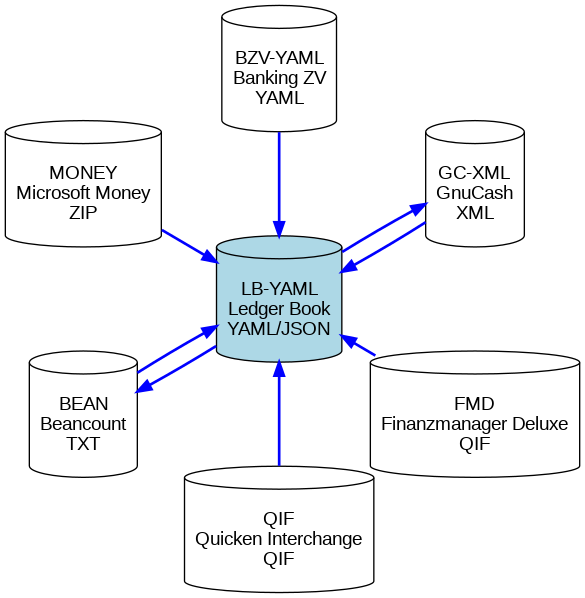
The pyNomina tool follows a Hub and Spoke model for conversion between different personal accounting file formats. The Ledger Book (YAML/JSON) format acts as the hub, with each supported format serving as a spoke. This setup simplifies conversions by allowing data to be transformed from any spoke to the hub and then to any other spoke format.
https://diagrams.bitplan.com/render/png/0xa0be5aae.png
| Format | Type | Description | Wikidata Entry |
|---|---|---|---|
| Ledger Book YAML/JSON | Hub | Main format of pyNomina for converting between formats. | Ledger Book |
| Beancount | Spoke | A plaintext accounting format. | Beancount |
| GnuCash XML | Spoke | An XML-based format used by GnuCash. | GnuCash |
| Microsoft Money | Spoke | Zip File exported with mny_export script using mdb-tools | Microsoft Money |
| Finanzmanager Deluxe (QIF) | Spoke | A variant of QIF used by Finanzmanager Deluxe. | Finanzmanager Deluxe |
| Quicken Interchange Format | Spoke | Quicken Interchange Format (QIF) | Quicken |
| pyNomina Banking ZV YAML | Spoke | A format for exporting banking data in YAML or JSON. | Banking ZV |
pip install pynomina
# alternatively if your pip is not a python3 pip
pip3 install pynomina
# local install from source directory of pynomina
pip install .
pip install pynomina  -U
# alternatively if your pip is not a python3 pip
pip3 install pynomina -U
nomina -h
usage: nomina [-h] [-a] [--apache APACHE] [-c] [-d]
              [--debugServer DEBUGSERVER] [--debugPort DEBUGPORT]
              [--debugRemotePath DEBUGREMOTEPATH]
              [--debugLocalPath DEBUGLOCALPATH] [-l] [-i INPUT] [-rol]
              [--host HOST] [--port PORT] [-s] [-V] [-v] [-rp ROOT_PATH]
              [--convert CONVERT] [--format {LB-YAML,GC-XML,BEAN}] [-o OUTPUT]
Personal finance tool
options:
  -h, --help            show this help message and exit
  -a, --about           show about info [default: False]
  --apache APACHE       create an apache configuration file for the given
                        domain
  -c, --client          start client [default: False]
  -d, --debug           show debug info [default: False]
  --debugServer DEBUGSERVER
                        remote debug Server
  --debugPort DEBUGPORT
                        remote debug Port
  --debugRemotePath DEBUGREMOTEPATH
                        remote debug Server path mapping - remotePath - path
                        on debug server
  --debugLocalPath DEBUGLOCALPATH
                        remote debug Server path mapping - localPath - path on
                        machine where python runs
  -l, --local           run with local file system access [default: False]
  -i INPUT, --input INPUT
                        input file
  -rol, --render_on_load
                        render on load [default: False]
  --host HOST           the host to serve / listen from [default: localhost]
  --port PORT           the port to serve from [default: 9849]
  -s, --serve           start webserver [default: False]
  -V, --version         show program's version number and exit
  -v, --verbose         show verbose output [default: False]
  -rp ROOT_PATH, --root_path ROOT_PATH
                        path to nomina files [default:
                        /Users/wf/Library/Python/3.12/lib/python/site-
                        packages/nomina_examples]
  --convert CONVERT     Convert the specified file to the desired format
  --format {LB-YAML,GC-XML,BEAN}
                        Output format for conversion [default: LB-YAML]
  -o OUTPUT, --output OUTPUT
                        Output file
There is a script test_cmdline that tries out some combinations of input and output file formats. see also Issue 7:command line conversion support
scripts/test_cmdline
nomina_examples/empty.yaml →  /tmp/nomina/empty_converted.yaml: LB-YAML✅
nomina_examples/empty.yaml →  /tmp/nomina/empty_converted.gnucash: GC-XML✅
nomina_examples/empty.yaml →  /tmp/nomina/empty_converted.beancount: BEAN✅
...
nomina -s -l
NiceGUI ready to go on http://localhost:9849
| Ticket | |
|---|---|
| number | 19 |
| title | add account view |
| createdAt | 2024-10-13 13:22:07+00:00 |
| closedAt | 2024-10-13 13:22:27+00:00 |
| url | |
| project | pynomina→Pynomina |
| Ticket | |
|---|---|
| number | 18 |
| title | add a book view |
| createdAt | 2024-10-12 16:52:44+00:00 |
| closedAt | 2024-10-12 16:53:06+00:00 |
| url | |
| project | pynomina→Pynomina |
| Ticket | |
|---|---|
| number | 16 |
| title | handle VAT Codes |
| createdAt | 2024-10-12 11:49:11+00:00 |
| closedAt | |
| url | |
| project | pynomina→Pynomina |
| Ticket | |
|---|---|
| number | 15 |
| title | enforce beancount account naming |
| createdAt | 2024-10-11 13:07:50+00:00 |
| closedAt | |
| url | |
| project | pynomina→Pynomina |
| Ticket | |
|---|---|
| number | 14 |
| title | add calc_balances and remove_unused_accounts function |
| createdAt | 2024-10-10 12:04:44+00:00 |
| closedAt | 2024-10-10 12:05:49+00:00 |
| url | |
| project | pynomina→Pynomina |
| Ticket | |
|---|---|
| number | 12 |
| title | add Microsoft Money support |
| createdAt | 2024-10-09 11:43:54+00:00 |
| closedAt | 2024-10-10 03:49:15+00:00 |
| url | |
| project | pynomina→Pynomina |
| Ticket | |
|---|---|
| number | 10 |
| title | Beancount conversion problem with expenses2024_bzv example |
| createdAt | 2024-10-09 09:32:22+00:00 |
| closedAt | 2024-10-11 08:26:00+00:00 |
| url | |
| project | pynomina→Pynomina |
| Ticket | |
|---|---|
| number | 9 |
| title | file format detection |
| createdAt | 2024-10-08 09:25:56+00:00 |
| closedAt | 2024-10-08 10:07:27+00:00 |
| url | |
| project | pynomina→Pynomina |
| Ticket | |
|---|---|
| number | 8 |
| title | Beancount conversion support |
| createdAt | 2024-10-07 06:50:25+00:00 |
| closedAt | 2024-10-09 09:32:36+00:00 |
| url | |
| project | pynomina→Pynomina |
| Ticket | |
|---|---|
| number | 7 |
| title | command line conversion support |
| createdAt | 2024-10-06 19:30:37+00:00 |
| closedAt | 2024-10-09 09:30:53+00:00 |
| url | |
| project | pynomina→Pynomina |
| Ticket | |
|---|---|
| number | 6 |
| title | Subsembly JSON (BankingZV) export support |
| createdAt | 2024-10-06 19:26:20+00:00 |
| closedAt | 2024-10-09 09:12:14+00:00 |
| url | |
| project | pynomina→Pynomina |
| Ticket | |
|---|---|
| number | 5 |
| title | Quicken QIF format support (very simple or Finanzmanager Deluxe Export format for a start ...) |
| createdAt | 2024-10-06 16:50:15+00:00 |
| closedAt | 2024-10-06 19:25:04+00:00 |
| url | |
| project | pynomina→Pynomina |
| Ticket | |
|---|---|
| number | 4 |
| title | GnuCash XML support |
| createdAt | 2024-10-06 12:07:54+00:00 |
| closedAt | 2024-10-06 19:25:23+00:00 |
| url | |
| project | pynomina→Pynomina |
| Ticket | |
|---|---|
| number | 3 |
| title | Abstract ledger |
| createdAt | 2024-10-06 08:58:56+00:00 |
| closedAt | 2024-10-06 12:06:15+00:00 |
| url | |
| project | pynomina→Pynomina |
| Ticket | |
|---|---|
| number | 2 |
| title | setup open checkos compatible opensource project |
| createdAt | 2024-10-06 07:54:51+00:00 |
| closedAt | 2024-10-06 07:56:35+00:00 |
| url | |
| project | pynomina→Pynomina |
The testcases are python unittest modules see https://github.com/WolfgangFahl/pynomina/tree/main/tests. These tests are run as part of the continuous integration github actions To run the tests manually there is a "test" script in the scripts directory:
scripts/test
Starting test test_read_bzv, debug=True ...
# Accounts: 3
# Transactions: 2
Date Range: 2024-10-06 to 2024-10-06
# Categories: 1
# Currencies: EUR: 2
Other Details:
  name: expenses2024
  owner: John Doe
test test_read_bzv, debug=True took   0.0 s
.Starting test test_conversions, debug=True ...
Converting Ledger Book None to GC-XML
...
Ran 17 tests in 4.518s
OK
see also https://github.com/WolfgangFahl/pynomina/issues/3
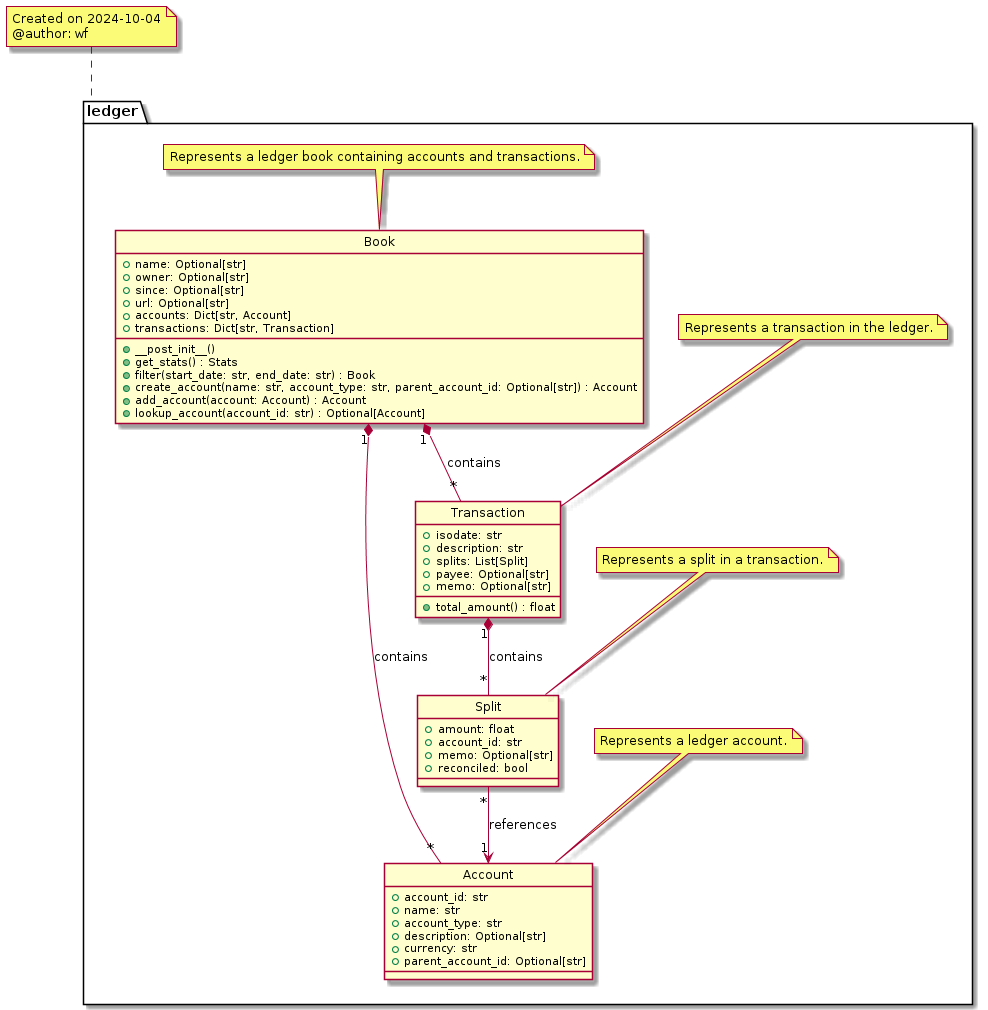
The pynomina Ledger Book model consists of four main classes:
These are the necessary classes which work together to represent a comprehensive financial ledger records.
https://diagrams.bitplan.com/render/png/0xfec2cab6.png
The Book class represents the main container for all financial data. It includes:
The Account class represents a hierarchy of individual financial accounts within the ledger. It includes:
The Transaction class represents individual financial transactions. It includes:
The Split class represents the individual components of a transaction, showing how money moves between accounts. It includes:
Here's an example of how the ledger model is used in practice:
owner: Wolfgang Fahl
url: https://github.com/WolfgangFahl/pynomina/blob/main/nomina_examples/expenses2024.yaml
since: 2024-10-06
accounts:
  Expenses:
    account_id: Expenses
    name: Expenses
    account_type: EXPENSE
    description: 'General Expenses'
    currency: EUR
  Expenses:Food:
    account_id: Expenses:Food
    name: Dining
    account_type: EXPENSE
    description: 'Expenses for Food'
    currency: EUR
    parent_account_id: Expenses
  Cash in wallet:
    account_id: Wallet
    name: Cash in Wallet
    account_type: EXPENSE
    description: ''
    currency: EUR
transactions:
  Bakery2024-10-06_0900_1:
    isodate: '2024-10-06'
    description: Bread
    splits:
      - amount: -3.50
        account_id: Cash in Wallet
      - amount: 3.50
        account_id: Expenses:Dining
        memo: Fresh sourdough bread
  Bakery2024-10-06_0900_2:
    isodate: '2024-10-06'
    description: Buns for Breakfast
    splits:
      - amount: -2.40
        account_id: Cash in Wallet
      - amount: 2.40
        account_id: Expenses:Dining
        memo: 4 whole grain buns
The ledger model is implemented in Python, utilizing dataclasses and type hinting for clear and maintainable code. The `@lod_storable` decorator is used to enable easy serialization and deserialization of the data in YAML and/or JSON and other formats. The core idea is that the records should be readily available an tabular "list of dicts (lod)" format.